SMS Notifications & Consent
Last updated: June 18, 2026
The messaging program
Matchup (matchup.us), operated by Building 13 LLC, sends transactional SMS text notifications to its own registered users about their own volleyball-league activity. Recipients are individuals who have created a Matchup account and chosen to add their own mobile number. We send messages such as an opt-in confirmation, score-entry reminders, match reschedule and cancellation alerts, substitute-player approval requests, and registration and payment confirmations. We never send marketing or promotional SMS.
How you opt in (complete workflow)
SMS is off by default. No messages are sent unless you take the following active steps yourself — there is no pre-checked box and no consent is assumed:
- Create a Matchup account at matchup.us/register and sign in.
- Open Settings.
- Under “Delivery methods,” find the Text messages option and tap Enable. This reveals a phone-number field.
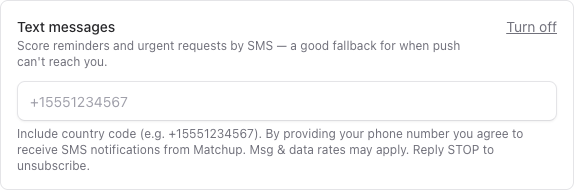
- Type your own mobile number (with country code) into the field. The consent disclosure shown below appears directly beneath it.
- Tap Save. We then send a one-time confirmation SMS to that number (double opt-in). You only receive further messages after this step.
You can turn SMS off at any time by tapping Turn off in that same panel, by removing your number, or by replying STOP to any message.
The consent disclosure
This exact disclosure is displayed directly beside the phone-number field at the moment you enter your number:
“Include country code (e.g. +15551234567). By providing your phone number you agree to receive SMS notifications from Matchup. Msg & data rates may apply. Reply STOP to unsubscribe.”
What we send & how often
Messages are transactional and triggered by your own participation in a league or a scheduled match — they are not sent on a fixed schedule. Frequency varies with your activity. Example messages:
- “Matchup: You're now opted in to SMS notifications for your volleyball leagues. Msg&Data rates may apply. Reply STOP to unsubscribe, HELP for help.”
- “Matchup: Reminder to submit scores for The Spikers vs Net Ninjas → matchup.us/matches/456. Reply STOP to opt out.”
- “Matchup: You've been requested as a substitute for The Spikers vs Net Ninjas. Reply STOP to opt out.”
- “Matchup: Your match was rescheduled to Tue Jun 10 at 7:00pm at Miami Valley Sand. Reply STOP to opt out.”
Help & opt-out keywords
- STOP (or STOPALL, UNSUBSCRIBE, CANCEL, END, QUIT) — stops all messages. You'll get one confirmation, then nothing further.
- HELP (or INFO) — returns support contact and program info.
- START (or YES) — re-subscribes after a STOP.
Message and data rates may apply. Carriers are not liable for delayed or undelivered messages.
Privacy
No mobile information will be shared with third parties or affiliates for marketing or promotional purposes. Phone numbers are shared only with our messaging provider (Twilio) for the sole purpose of delivering the messages you have consented to receive. Full details are in our Privacy Policy and Terms of Service.
Contact
Questions about SMS? Email support@matchup.us, or write to Building 13 LLC, 102 Forestview Drive, Dayton, OH 45459.